運用的グラフを診る(DNS編)
...おはようございます。インフラ宮下です。
ビックデータ時代様々なデータやグラフがあふれかえってます。 そんなグラフに関するお話です。
はじめに
インフラ運用で使う実際のグラフを使って、どのような事が起きていてどんな対処が必要になるのかを見ていきたいと思います。
使うグラフ
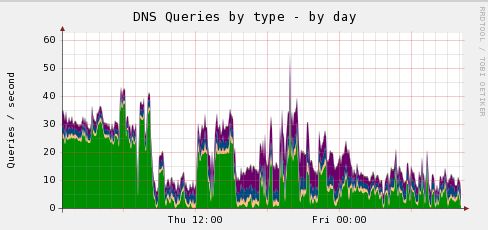
muninでbindのクエリ統計をとったグラフです。 OSはCentOS release 5.9になります。
問題点
グラフの色はクエリタイプ毎に分類されているのですが、AM8時前までで一番多いのはANYレコードです。 これは「DNS AMP攻撃」が行われた形跡です。
ISPにおけるDoS/DDoS攻撃の検知・対策技術 DNS Amp攻撃の解説と、踏み台にされないためのBIND DNSの設定
対応策
今回は意図的に対策していないBindを利用している為、攻撃にさらされてしまいました。 DNS AMP攻撃がひどいのが、勝手にトラフィックを使って他人を攻撃してしまっているので本人に悪気が無くても加害者になってしまいます。 対策は既に出回っていますが、bindバージョンアップして再帰的問い合わせを実施しないか、クエリを受け付けるNWを制限するというのが一般的です。 あとはCentOS6系であればiptablesで特定ドメインのクエリを止める事が出来ます。 (出来るのはCentOS6以上)
NSサーバへのANY? . な連続リクエスト対応 DNSアタックとiptablesフィルタ
実際のANYリクエストで多いのは「isc.org」だと思います。どちらかと言うと長期間にわたってじんわりと来る感じ。 その他では「uspsoig.gov」や「defcon.org」「doleta.gov」が最近良く目にします。
先程のiptablesでブロックする方法は、 DNS Amplification Attacks Observer など情報は出回っていますのでサービスに影響が出ない範囲で実施してみてください。
注意しなければいけない点としては、qmailがメール送受信時の名前解決にANYレコードを引いてくるので何でもかんでもANYははじいてしまうとメール障害となってしまいます。 qmailとDNSSEC <a http://mediakisslab.net/doku.php?id=linux:qmail:memo" target="_blank">DNSSEC対応
さいごに
昔は自前でDNSサーバをたてて、そのまま放置して今も稼働しているなんて言うケースはどこでもあると思います。 (むしろ外部サービスとかで使われているDNSはきちんと担当の方がいて健全に運用している気がします) グレイな環境で手が出ないオープンリゾルバなDNSは怖いですな。 (昔はメールの不正中継の方が花形だったのに…)
Chefで既存手順のレシピを書く5(munin、zabbix)
...おつかれさまです。小宮です。
前回に引き続き、munin,zabbixの手順のレシピをご紹介します。レシピはこの記事でおしまいです。
記事の最後にはレシピの適用方法を記載します。・muninのレシピ
# cd /opt/src/rpms
# mkdir -p /root/chef-repo/site-cookbooks/munin/files/default/rpms
# mkdir -p /root/chef-repo/site-cookbooks/munin/files/default/var/www/html/munin
# mkdir /root/chef-repo/site-cookbooks/munin/files/default/etc/munin/plugin-conf.d
# cp -p /etc/munin/munin.conf /root/chef-repo/site-cookbooks/munin/files/default/etc/munin/
# scp -Cp xxx-web01:/etc/munin/munin-node.conf /root/chef-repo/site-cookbooks/munin/files/default/etc/munin/
# cp -p /var/www/html/munin/.htaccess /root/chef-repo/site-cookbooks/munin/files/default/var/www/html/munin/
# cp -p /etc/munin/plugin-conf.d/munin-node /root/chef-repo/site-cookbooks/munin/files/default/etc/munin/plugin-conf.d/
# tar cf /root/chef-repo/site-cookbooks/munin/files/default/rpms/munin-node-rpm.tar ./munin-node-rpm/
# tar tf /root/chef-repo/site-cookbooks/munin/files/default/rpms/munin-node-rpm.tar ./munin-node-rpm/
# tar cf /root/chef-repo/site-cookbooks/munin/files/default/rpms/munin-serv-rpm.tar ./munin-serv-rpm/
# tar tf /root/chef-repo/site-cookbooks/munin/files/default/rpms/munin-serv-rpm.tar ./munin-serv-rpm/

# cd /root/chef-repo/site-cookbooks/munin/recipes
# touch munin-node.rb munin-server.rb munin-node-db.rb munin-node-web.rb
# vi munin-node.rb
    filename = "munin-node-rpm.tar"
    cookbook_file "/tmp/#{filename}" do
      source "rpms/#{filename}"
      mode 0644
    end

    package "perl-DBI" do
      not_if "rpm -qa|grep perl-DBI"
      action :install
    end

    script "install_munin-node" do
      not_if 'ls /etc/munin/munin-node.conf'
      interpreter "bash"
      user        "root"
      code <<-EOL
        cd /tmp
        tar xf /tmp/#{filename}
        rpm -i /tmp/munin-node-rpm/perl-Dig*
        rpm -i /tmp/munin-node-rpm/perl-{C*,H*,I*,L*,N*,X*,li*}
        rpm -i /tmp/munin-node-rpm/perl-DBD-Pg*
        rpm -i /tmp/munin-node-rpm/munin-*
        cp -p /etc/munin/munin-node.conf{,.org}
      EOL
    end

    cookbook_file "/etc/munin/munin-node.conf" do
      source "etc/munin/munin-node.conf"
      mode 0644
    end

    script "link_plugins" do
      not_if 'ls /etc/munin/plugins/tcp'
      interpreter "bash"
      user        "root"
      code <<-EOL
        rm -f /etc/munin/plugins/*
        ln -s /usr/share/munin/plugins/cpu /etc/munin/plugins/cpu
        ln -s /usr/share/munin/plugins/if_err_ /etc/munin/plugins/if_err_eth0
        ln -s /usr/share/munin/plugins/if_ /etc/munin/plugins/if_eth0
        ln -s /usr/share/munin/plugins/iostat /etc/munin/plugins/iostat
        ln -s /usr/share/munin/plugins/load /etc/munin/plugins/load
        ln -s /usr/share/munin/plugins/memory /etc/munin/plugins/memory
        ln -s /usr/share/munin/plugins/tcp /etc/munin/plugins/tcp
        ln -s /usr/share/munin/plugins/df /etc/munin/plugins/df
      EOL
    end

    service "munin-node" do
      supports :status => true, :restart => true
      action [ :enable, :start ]
    end


# vi munin-server.rb
    filename = "munin-serv-rpm.tar"
    cookbook_file "/tmp/#{filename}" do
      source "rpms/#{filename}"
      mode 0644
    end

    script "install_munin-serv" do
      not_if 'ls /etc/munin/munin.conf'
      interpreter "bash"
      user        "root"
      code <<-EOL
        tar xf /tmp/#{filename}
        rpm -i /tmp/munin-serv-rpm/*
        cp -p /etc/munin/munin.conf{,.org}
      EOL
    end

    cookbook_file "/etc/munin/munin.conf" do
      source "etc/munin/munin.conf"
      mode 0644
    end

    service "munin-node" do
      supports :status => true, :restart => true
      action [ :enable, :start ]
    end

    cookbook_file "/var/www/html/munin/.htaccess" do
      source "var/www/html/munin/.htaccess"
      mode 0644
    end

# vi munin-node-web.rb
    script "link_plugins_web" do
      not_if 'ls /etc/munin/plugins/apache_accesses'
      interpreter "bash"
      user        "root"
      code <<-EOL
        ln -s /usr/share/munin/plugins/apache_accesses /etc/munin/plugins/apache_accesses
        ln -s /usr/share/munin/plugins/apache_processes /etc/munin/plugins/apache_processes
      EOL
    end

    service "munin-node" do
      supports :status => true, :restart => true
      action [ :enable, :restart ]
    end

# vi munin-node-db.rb
    script "link_plugins_db" do
      not_if 'ls /etc/munin/plugins/mysql_threads'
      interpreter "bash"
      user        "root"
      code <<-EOL
        ln -s /usr/share/munin/plugins/mysql_queries /etc/munin/plugins/mysql_queries
        ln -s /usr/share/munin/plugins/mysql_slowqueries /etc/munin/plugins/mysql_slowqueries
        ln -s /usr/share/munin/plugins/mysql_threads /etc/munin/plugins/mysql_threads
      EOL
    end

    cookbook_file "/etc/munin/plugin-conf.d/munin-node" do
      source "etc/munin/plugin-conf.d/munin-node"
      mode 0644
    end

    service "munin-node" do
      supports :status => true, :restart => true
      action [ :enable, :restart ]
    end
role毎にちがうコマンド実行するとかひとつのレシピ内でやる方法ってあるのかが気になります。ifとかでできるんでしょうか。
今回はそんな方法はわからなかったので、webとdbそれぞれ用のレシピを分けて作りました。
roleに適用する順序は、munin-node.rbを最初にしないとプラグインが最初全部消される仕様です。(レシピは上から順に実行されます)muninのデータを引き継ぐ方法
...こんにちわ。 プラットフォーム担当の宮下です。
今回は、オープンソースのモニタリングツール「munin」でホスト名を変更した時に
今までのデータもそのまま移行する方法を説明します。
なお使用するmuninのバージョンは、1.4.5を使います。1)RRDのデータを移す。
muninのグラフ描写を行っている「RRD tool」のデータを移行します。
[shell] # cd /var/lib/munin/DIR # rename test01 test01-old ./test01-* [/shell]
格納場所に移動して、ファイルを一括で変換してしまいます。
2)HTMLファイルを移す。
[shell] # cd /var/www/html/munin/DIR # mkdir test01-old # chown munin:munin test01-old # cp -pfR test01/* test01-old/ [/shell]
生成されているHTMLと画像ファイルをまとめて移動します。
移動先のディレクトリが既にある場合は、mkdirとchownは飛ばして下さい。
またOSによってはaliasで「cp -i」が入っているかも知れません。
その時は、バックスラッシュを使って一括移動をします。[shell] # \cp -pfR test01/* test01-old/ [/shell]
これで次の収集間隔から新しいホスト名でデータが更新されていきます。
地味な作業ですが、過去のデータを捨ててしまうのはもったいない気がします。
そんな時はデータも一緒に移動してあげて下さい。